AI-powered unused detection
Scans posts, pages, widgets, menus and theme files, then scores every attachment 0–100% so you know exactly how safe it is to remove.
Free WordPress plugin
Media Wipe scans your posts, pages, widgets, menus and theme files, scores how safe every attachment is to remove, and keeps a recycle bin and an audit log behind each deletion.
View on WordPress.org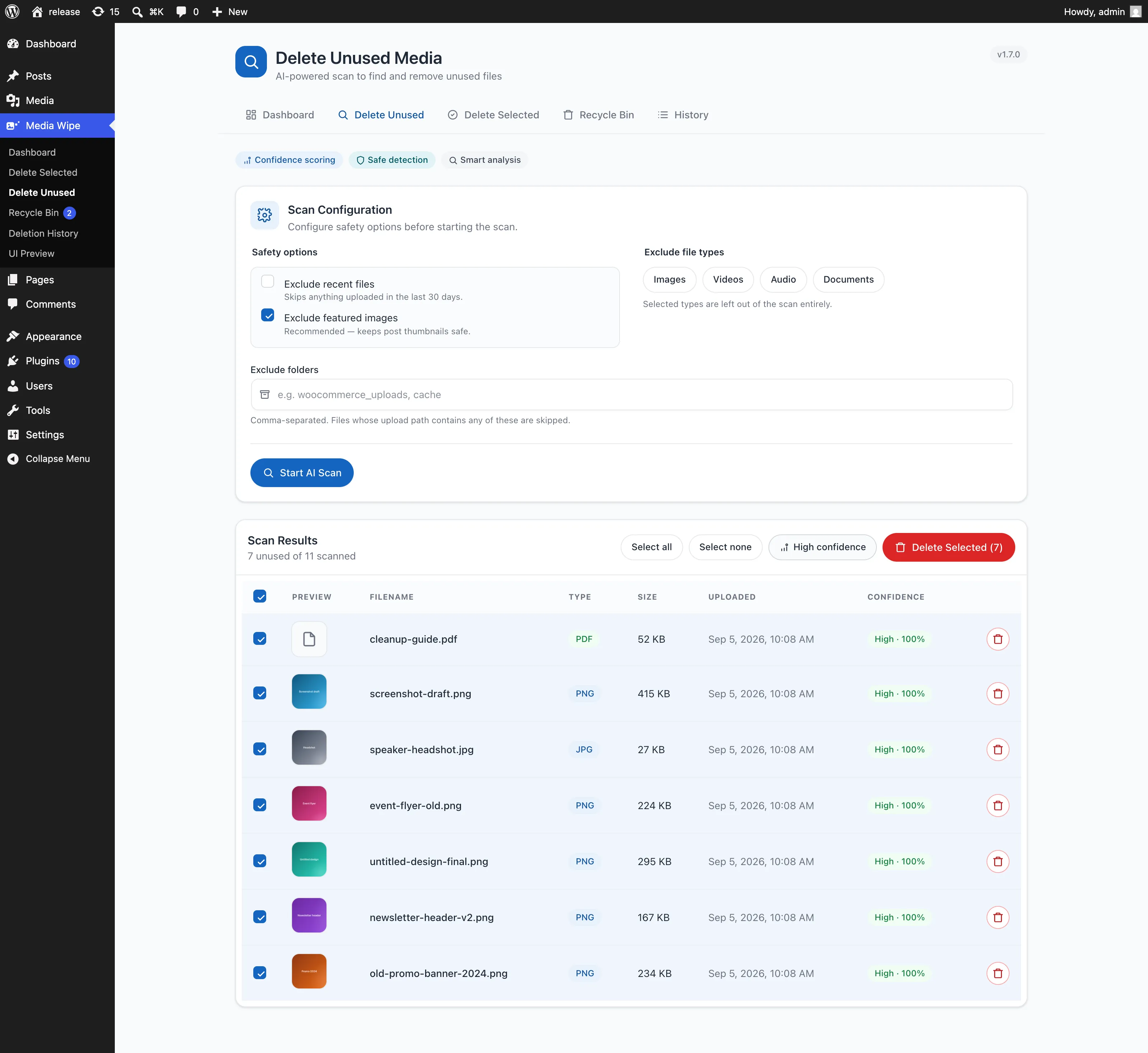
Features
Four deletion workflows, a safety net under all of them, and an interface that does not fall apart when your library has thousands of files.
Scans posts, pages, widgets, menus and theme files, then scores every attachment 0–100% so you know exactly how safe it is to remove.
High, Medium and Low badges on every result. "Select High Confidence Only" picks the 90%+ files in a single click.
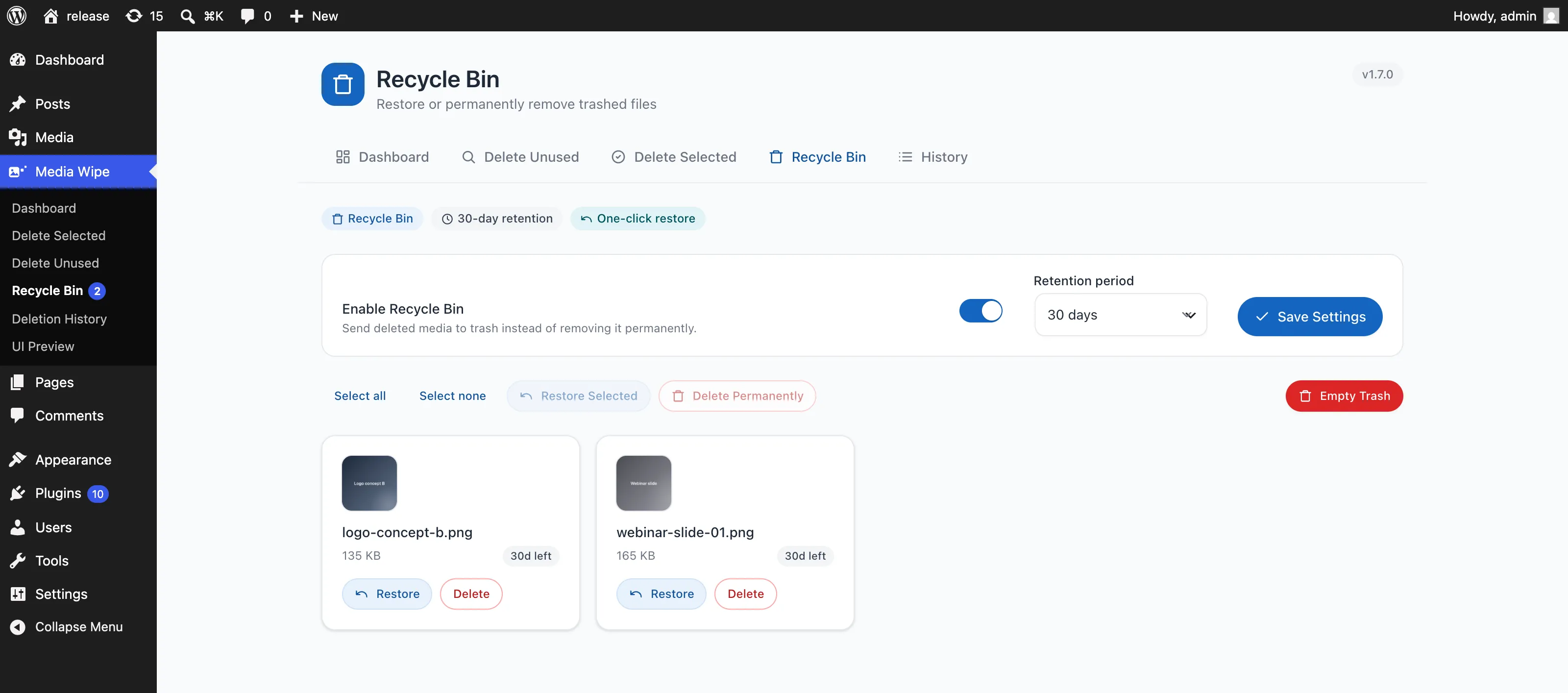
Soft-delete instead of destroy. Files sit in the bin for a retention window you choose (7–90 days) and restore in one click.
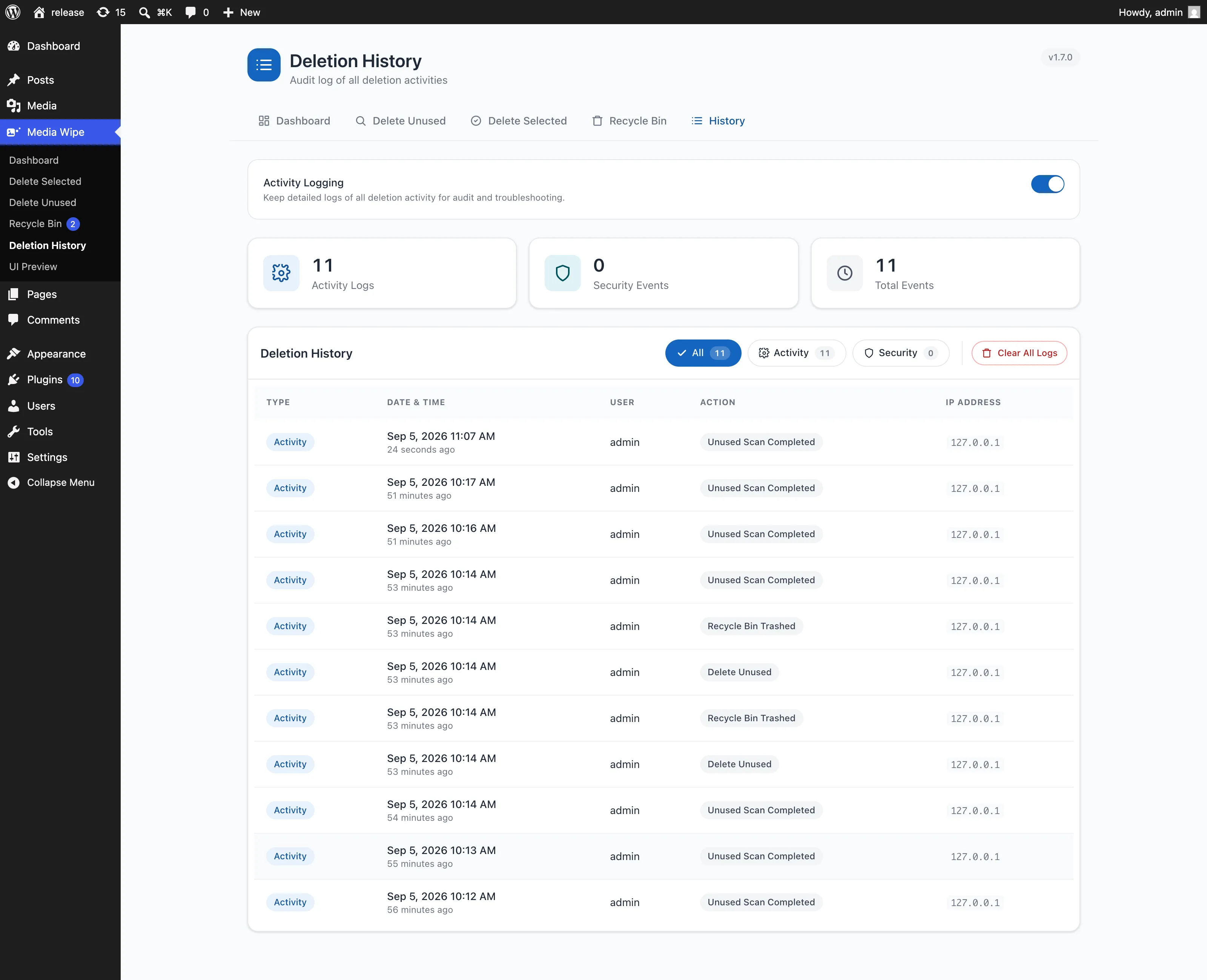
Every action recorded with timestamp, user and IP address. Filter by activity or security events, and export the log for compliance.
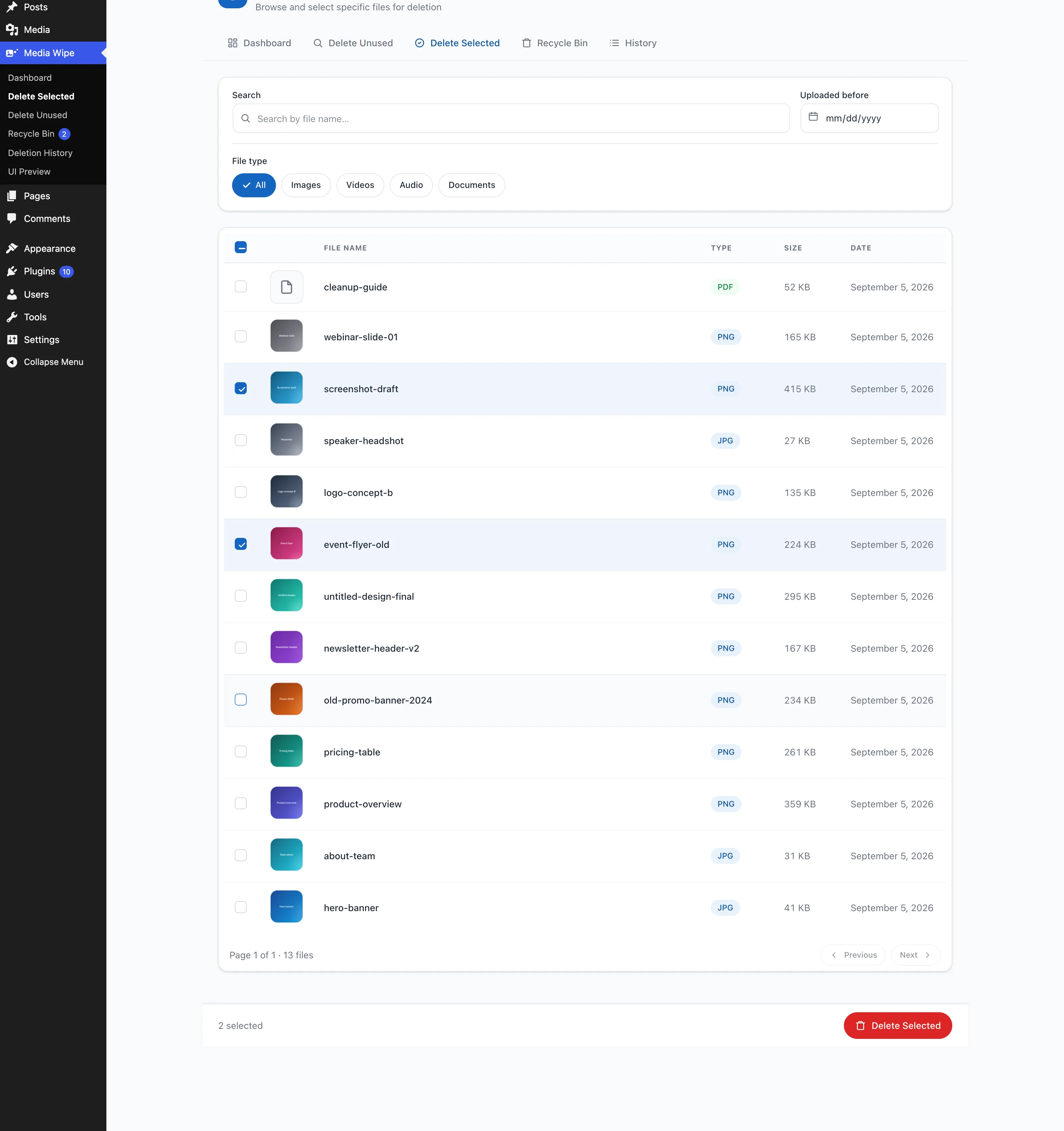
Search by name, filter by type or upload date, paginate, and bulk-select with a partial state when only some rows are picked. Thumbnail previews and file type badges throughout.
A full library wipe exists when you need it, gated behind multi-step confirmation and an explicit backup acknowledgement.
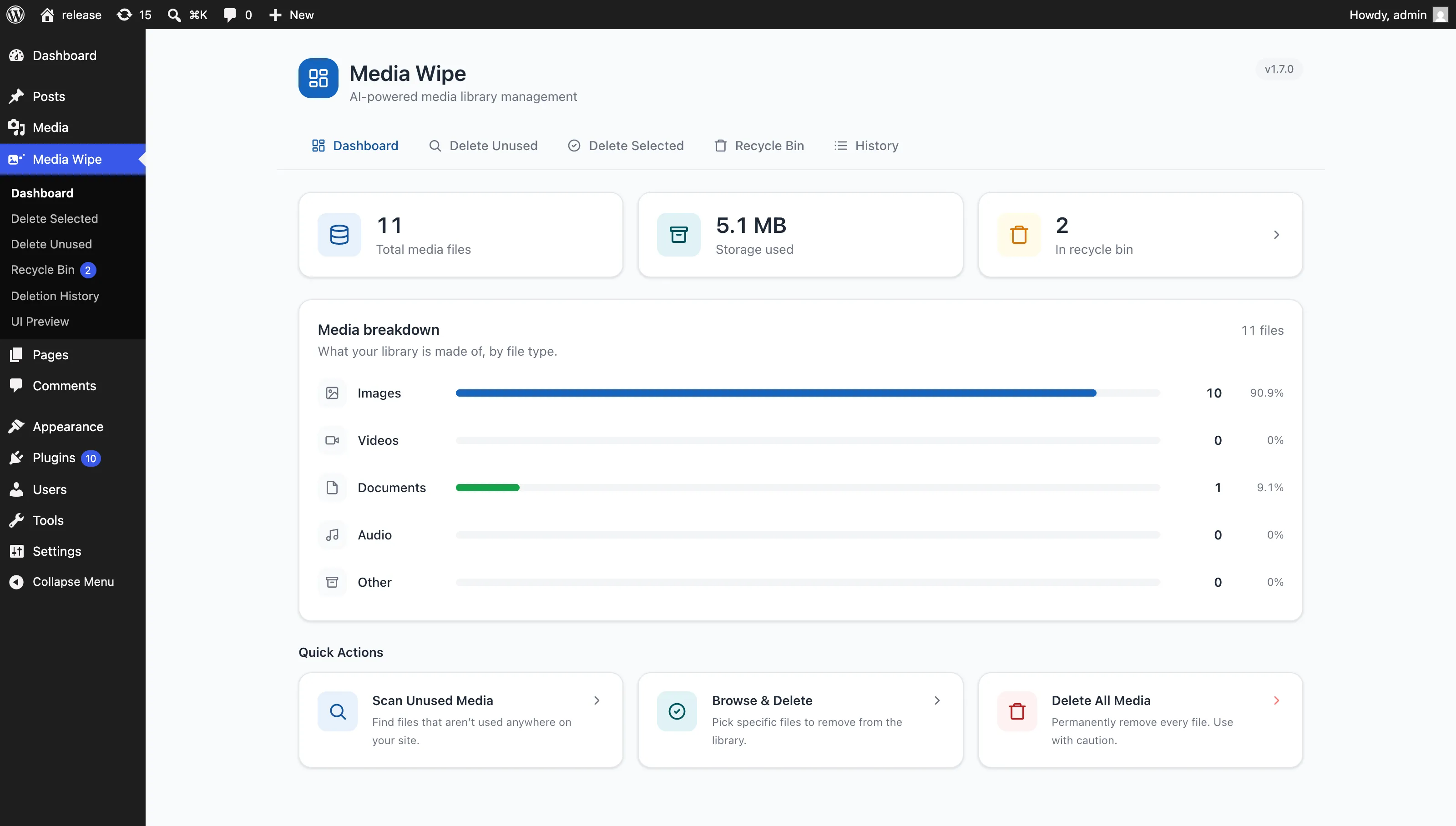
Total files, disk usage and a breakdown by images, video, documents and audio, plus quick actions for every workflow.
Fully responsive admin screens with touch-friendly controls and horizontally scrolling tables. Clean up from your phone.
Inside the plugin
Every Media Wipe screen lives under a single admin menu, so scanning, reviewing, restoring and auditing never send you hunting through WordPress settings.
Three tiles up top for total files, storage used and whatever is sitting in the recycle bin, then a breakdown across images, video, documents and audio, with the three main actions one click away.
Skip recent uploads, featured images, whole file types or specific folders before you scan. Results come back with a 0 to 100% confidence score, and "High confidence" selects the safe set instantly.
A full table over your library: search by file name, narrow by upload date or file type, and page through results while a running count of what you have selected follows you down the screen.
Turn on the bin and deletions become reversible. Pick a retention period, watch the countdown on each file, restore in one click, or empty the trash when you are certain.
Activity and security events with timestamp, user and IP address. Filters carry their own counts, so you can see at a glance whether anything security-related has happened.
How it works
Three steps, and a reversible outcome at the end of them.
Configure safety options, such as excluding recent uploads or featured images, then start the AI scan. Progress streams in real time.
Every unused file comes back with a thumbnail, size, upload date and a confidence score. Sort, search and select what you trust.
Confirm, and files move to the Recycle Bin rather than vanishing. Restore anything within your retention window; the audit log keeps the receipts.
Safety
Media Wipe removes files permanently. That is the point. Every layer below exists so it only ever removes the files you meant.
Destructive actions require explicit confirmation, including a backup acknowledgement before a full library wipe.
Deletions are soft by default. Auto-purge runs on WP-Cron only after your chosen retention period expires.
Every AJAX endpoint is nonce-verified and capability-checked, so no one without the right role can trigger a deletion.
Bulk operations are throttled and batched, which protects both your database and your memory limit on large libraries.
Timestamp, user and IP for every deletion. Logging is opt-in, stored locally, and exportable when you need proof.
No external API calls and no telemetry. Scanning and logging happen entirely inside your own WordPress database.
Comparison
Measured against what WordPress gives you out of the box. We are not going to guess at what other plugins do. Every claim on the right is a Media Wipe feature you can verify in the screenshots above.
| Capability | Built-in media library | Media Wipe |
|---|---|---|
| Bulk-delete many files at once | One page at a time | Included |
| Find files nothing links to | Not available | AI scan with confidence score |
| Search, filter and paginate results | Basic media list | Included |
| Selection that survives pagination | Not available | Included |
| Undo a deletion | Not available | Recycle Bin, 7–90 days |
| Record of who deleted what, and when | Not available | Audit log with IP |
| Confirmation before destructive actions | Single prompt | Multi-step + backup check |
| Works on large libraries | Times out | Batched, memory-efficient |
Changelog
Six months of releases, from the first audit log to a full React rebuild of every admin screen.
Moving between the five admin screens no longer reloads the page, proper date field on Delete Selected.
Redesigned branding, keyboard focus and dialog labelling fixes, legacy code removed, navigation display corrected.
Every admin screen rebuilt on React with a reusable component library and a consistent design system.
Unified notification system, refreshed visuals, and critical fixes to the Delete All workflow.
Soft-delete with configurable retention, bulk restore, permanent delete and auto-purge via WP-Cron.
Confidence scoring, multiple scanning modes and real-time progress tracking for unused media.
Statistics dashboard, multi-step confirmations, document preview, audit logging and a settings page.
FAQ
Deletion is guarded by several layers: multi-step confirmation, an explicit backup acknowledgement for destructive actions, and a Recycle Bin that holds files for your chosen retention period. That said, always take a full backup before a bulk cleanup, because once a file is permanently removed it cannot be recovered.
The scanner checks posts, pages, widgets, menus and theme files for references to each attachment, then assigns a confidence score. Files scored 90% and above are very safe to delete. Medium and low scores are worth reviewing manually, which is why the "High confidence" button exists: it lets you act on the safe set without touching the rest.
Yes, while they are in the Recycle Bin. Enable it and deletions become soft, so files stay recoverable for the retention window you set (7 to 90 days) and restore with one click. After auto-purge runs, or if you delete permanently, files cannot be recovered.
No. There are no external API calls and no telemetry. Activity logging is opt-in, and every log entry is stored locally in your own WordPress database.
Yes. Scanning and deletion run in memory-efficient batches over AJAX with real-time progress, and bulk operations are rate limited so they do not overwhelm your server.
Not yet. Media Wipe currently targets single-site installs, and multisite network support is on the roadmap.
Nothing. Media Wipe is free and GPL-licensed on the WordPress.org plugin directory, with no paid tier and no upsells.
Still stuck? Ask in the support forum. Questions are usually answered within a day or two.
Install from your WordPress dashboard, run one scan, and see exactly how much of your media library nothing is using. Free forever, no account, no upsell.
Or search Media Wipe under Plugins → Add New in your dashboard.